Patent Ghost Writer 3.0.9 — Microsoft Word Add-In
Faster filewrapper imports, Quiet Mode, and review monitors.
This release is for power users who want fewer steps inside Word. Import USPTO filewrappers faster, keep inputs organized, use Quiet Mode for drafting content, and scan documents with review monitors.
What Changed
The Word Add-In update to show power users first.
The release story is speed and control inside Microsoft Word: fewer import steps, less conversational overhead, cleaner file handling, and automated document review.
Faster filewrapper import + Inputs
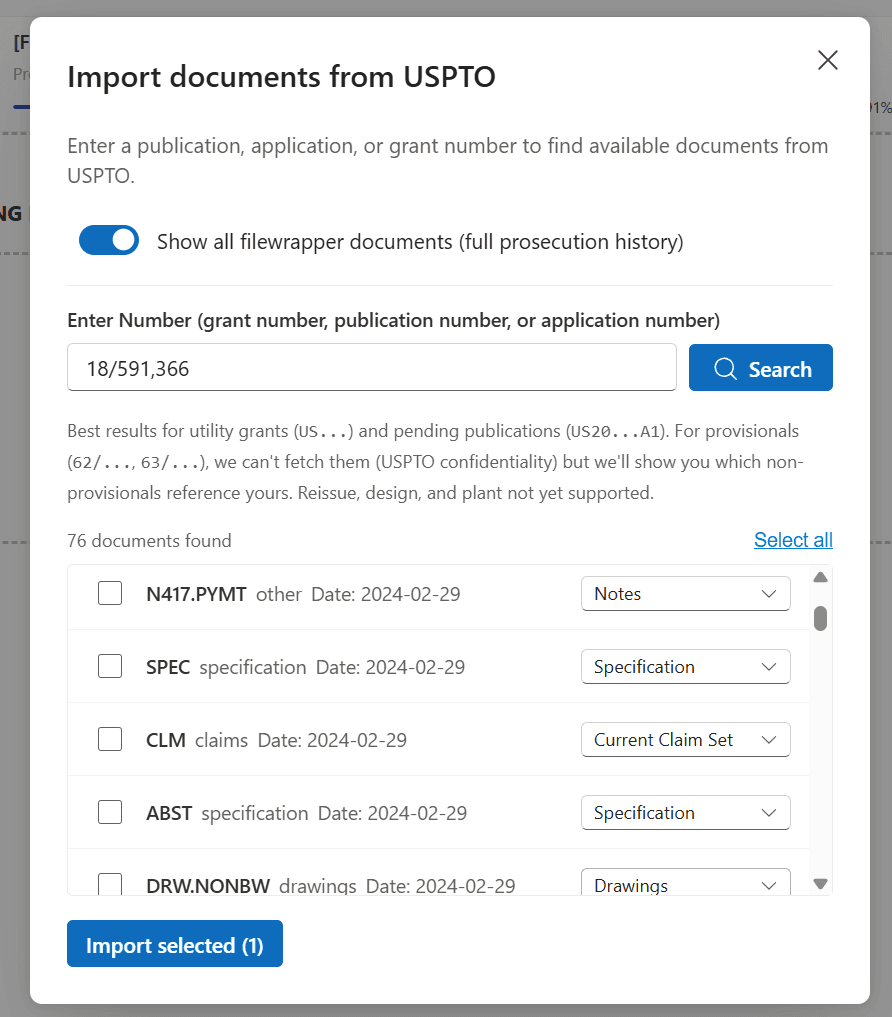
The USPTO filewrapper import path is faster, and users can manage imported file types from the same flow without re-uploading.
Quiet Mode
Quiet Mode makes JR less talkative and produces more drafting content ready to insert into your document. Try it with your next office action.
Document Review Monitors
Scan the document for rule compliance, terminology consistency, section references, contradictions, document flow, and source support.
Try It Now
Try the new Word Add-In flow on an office action.
1. Import the filewrapper.
Use the streamlined USPTO import flow to bring filewrapper documents into the Word Add-In with fewer manual choices.
2. Set the right document types.
Classify imported documents as specs, claims, drawings, notes, and other inputs directly from the import flow.
3. Turn on Quiet Mode.
Ask JR for office action drafting content and keep the answer focused on insertable text, not extra conversation.
Drafting Quality
Smarter context and more reliable drafting.
PGW can now search uploaded patent and reference documents during drafting, pulling more relevant passages into the generation process. The release also fixes issues that interrupted drafting flow, including formatting mismatches, instruction state problems, cancel behavior, file scoping, and Track Changes attribution.
Less chat. More draft.
Quiet Mode is the main PGW callout: use it when you want JR to produce document-ready language for the next response, claim amendment, or drafting pass.
Also improved in PGW 3.0.9
Drafting no longer stalls
Fresh documents no longer stop after only a header and title.
Formatting inheritance
Drafted text better follows the surrounding document style.
Instructions stay put
Instruction fields no longer disappear, duplicate, or revert when switching tabs.
Files stay scoped
Files uploaded for one document type no longer appear in unrelated document contexts.